Msty Claw 0.8.0: Making Agentic Work Feel More Connected
At Msty, our team is constantly striving to make agent-based work feel less like setup and more like a normal flow. The goal is to help you get better results, with fewer irrelevant switching, less repeated steps, and no more “why am i in the terminal again?” moments.
Msty Claw is built to make that work feel more connected. It brings chats, agents, tools, memory, workflows, and workspace context into one desktop app, close to the files and projects you already work on. If you are new here, think of it as an assistant that helps carry work forward, not just answer questions.
In earlier releases, we strengthened the basics: agent workflows, chat organization, Computer Use, Msty Claw Go, Playbooks, Memory, and workspace handling. That gave Claw a stronger foundation for real day-to-day work.
This release is about making Claw feel more aware, more helpful, and easier to shape around your way of working.
Inside 0.8.0, you will find Pulse for private work briefings, Side Chat for quick questions, and Handoff to an Agent for continuing work with agents. You will also find Rules for repeatable behavior without terminal trips, and Workspace Profile Files for bringing your existing workflow context into Claw.
Alongside the big features, we also smoothed out chats, the sidebar, Computer Use, mobile reconnects, and local runtime support, because small details shape the day-to-day experience.
What’s New in Msty Claw 0.8.0
Features
1. Pulse
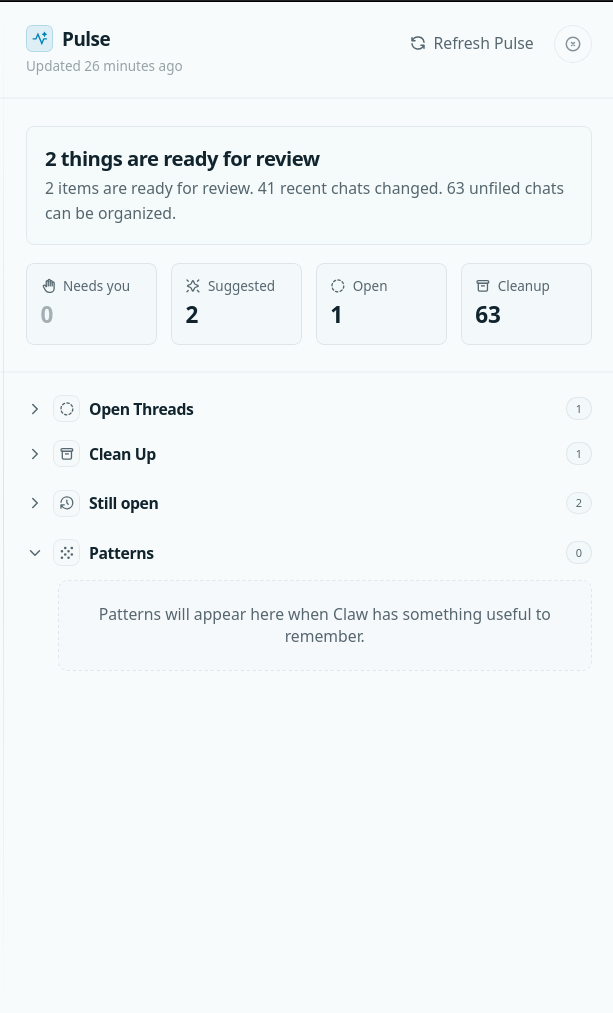
Pulse gives you a private briefing of the work that matters right now. It looks across your chats, schedules, playbooks, learning notes, and unfinished work, then brings the important things back into view.
It can show what needs your attention, surface open threads, suggest cleanup, and point to next steps Claw may be ready to help with. It also notices patterns in how you work, while still letting you keep, edit, or forget those learnings.
You can open Pulse from the title bar, the full drawer, the empty chat screen, or Msty Claw Go. Choose a model first, and Pulse can start preparing briefings for you.
2. Side Chat
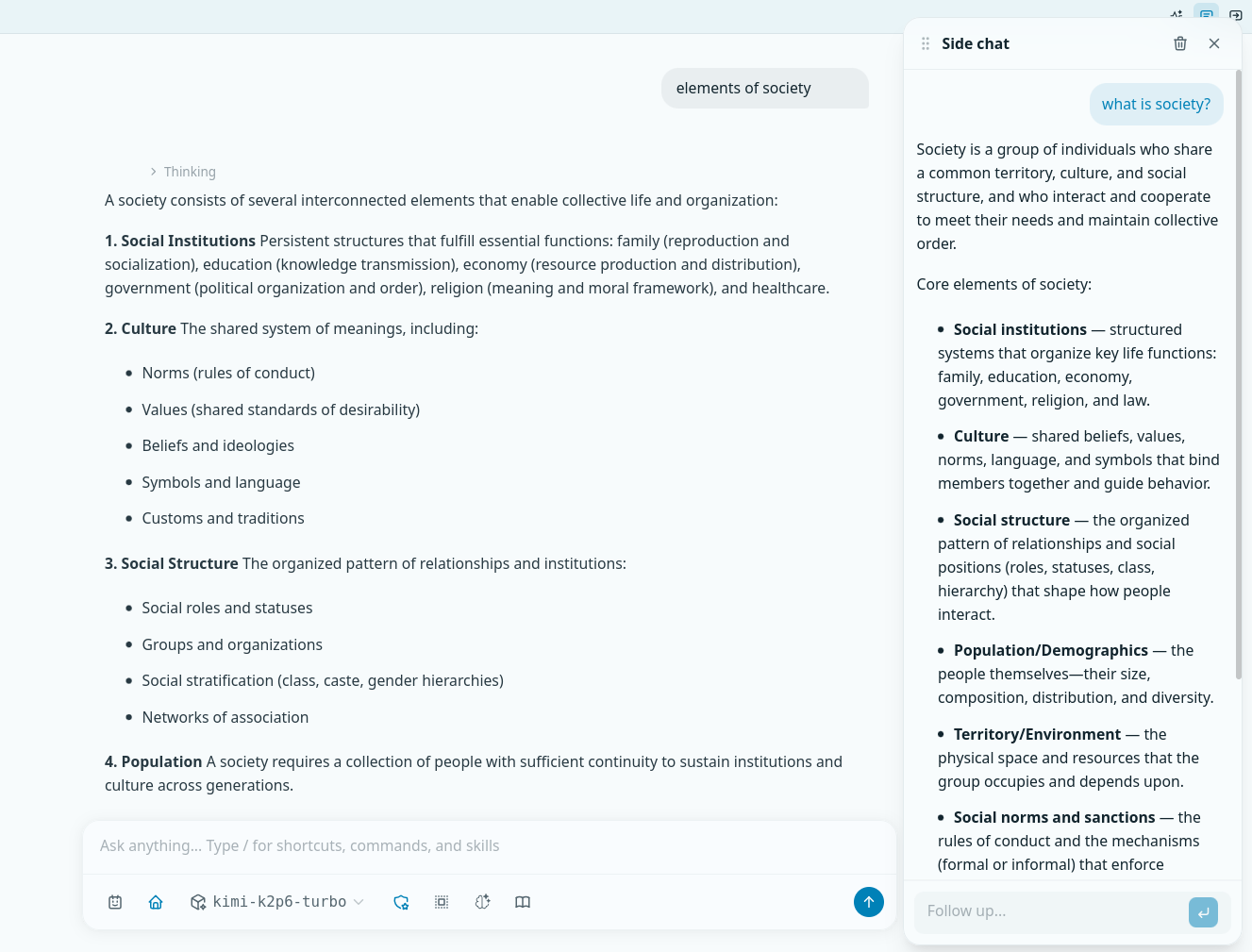
Side Chat gives you a small side conversation next to your main chat. It is for quick questions that come up while you are working, without interrupting the main thread.
You can ask things like “what did we decide?”, “what should I check?”, or “summarize this.” Side Chat understands the main chat as context, but keeps its own history separate, so your main conversation stays clean.
It uses the active provider and model, or the ones already saved on that chat. You can also use it from Msty Claw Go in the mobile Side Chat drawer.
3. Handoff to an Agent
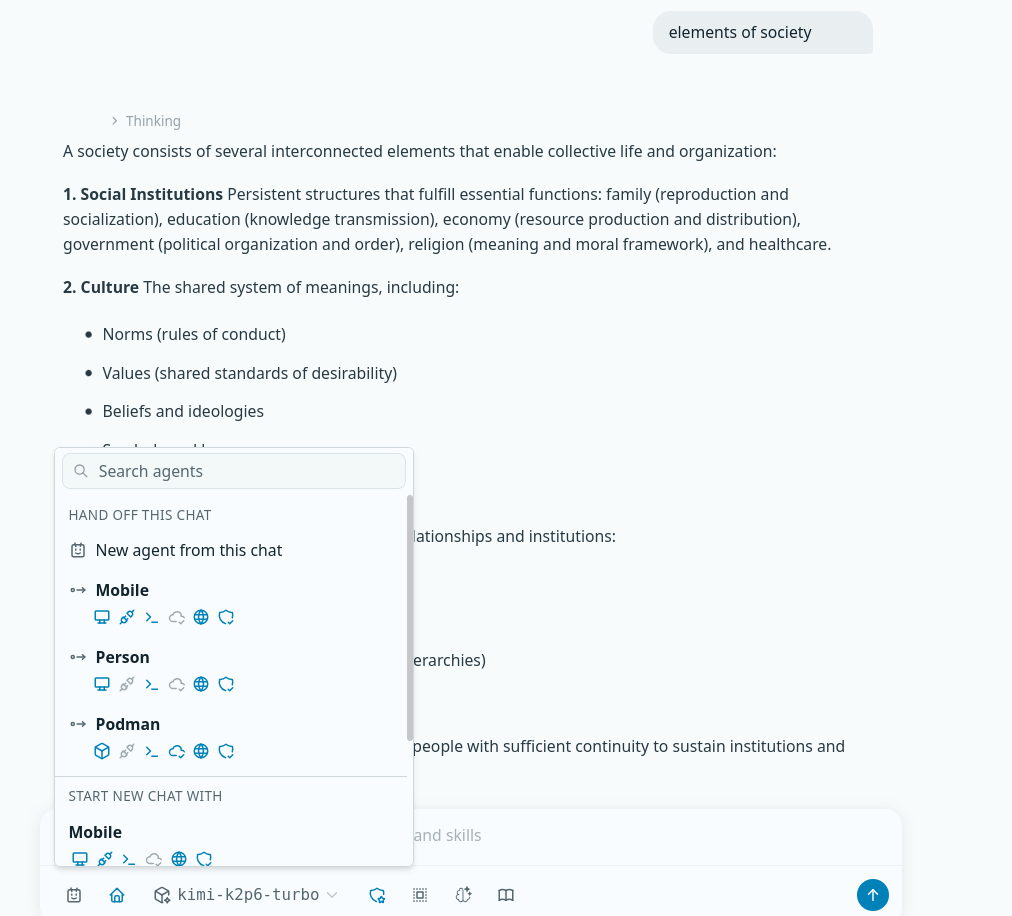
Handoff lets you pass a normal chat to an agent when the work needs to continue. Instead of starting over, the agent picks up from the existing chat history.
You can hand off to an agent you already have, or create a new one from the current chat. Claw carries over the conversation session, workspace folders, file access, provider, and model when possible.
If an older agent is no longer available, the chat is still safe to read, and you can move it to another agent.
4. Rules
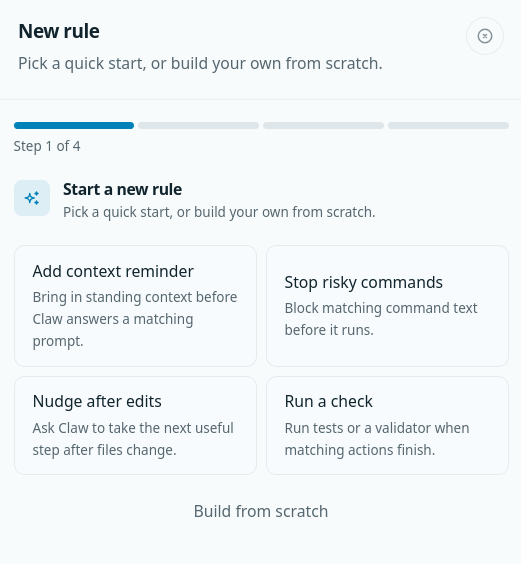
Rules let you shape how Claw behaves in repeated situations without sending you back to the terminal. You can manage them from the new Rules section in Settings.
A rule can run when a chat starts, before Claw replies, before an action runs, or after an action finishes. It can match prompts, action names, commands, action inputs, or action results.
Rules can guide Claw, stop an action, add a note, ask for a follow-up, or run a command. The builder includes quick starts and checks for missing details, so it is easier to create rules that actually work.
5. Workspace Profile Files
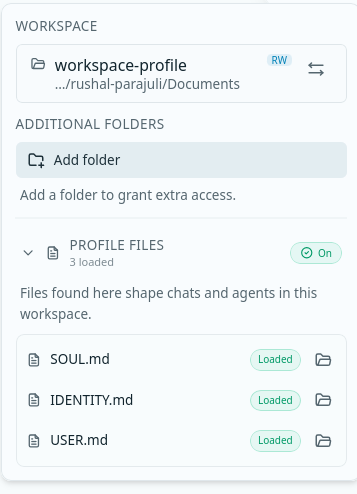
Workspace Profile Files help Claw understand the context you already keep in your projects. If your workspace has SOUL.md, IDENTITY.md, or USER.md, Claw can read them from the workspace root and use them as part of its context.
These files can guide Claw’s identity, user understanding, and working style for that workspace. You can turn the feature on or off in General Settings, and missing or empty files are skipped quietly.
When conflicts happen, Claw follows the instructions you chose first, so your context stays useful while you remain in control.
Improvements
Alongside the new features, 0.8.0 also cleans up a few everyday moments in Claw. These are not the loudest changes, but they matter when you are deep in work and just want the app to feel clear, steady, and easy to move around.
1. More Room for Your Chats
Recents & Pinned now shows more chats, so the important ones stay close.
Finished chats also show a small dot until you see them, so you know what changed without guessing.
2. Easier Sidebar Control
You can now click the left rail border to collapse or expand Folders and Workshop. Small change, real relief.
3. Better macOS Runtime Support
Msty Claw now supports OrbStack on macOS, alongside Docker and Podman.
4. Clearer Everyday Actions
You can now highlight assistant replies and copy only the part you need.
Computer Use setup also explains the CUA driver more clearly, so the next step feels less mysterious.
A More Connected Way to Work
Msty Claw 0.8.0 is all about making Agentic work feel more grounded in your everyday workflow. Less friction, closer context, and a workspace that feels easier to rely on.
For current users, this release should feel familiar, but more useful in the moments that usually slow you down. It helps you catch unfinished work, ask quick questions, hand things off, and shape Claw around the way you already work.
If you have not tried Msty Claw yet, 0.8.0 is a clearer look at what an Agentic workspace can feel like when it is built around real work.
This is the direction we are building toward: Agentic work that feels practical, connected, and easier to stay with.
Msty Claw Beta
Start using Msty Claw
Install Msty Claw in minutes, connect your workflows, and run autonomous tasks with privacy-first controls.
Free for personal use in beta.
Built For Real Work
- Privacy-first controls with local and online model options.
- Assign outcomes and let agents execute multi-step tasks.
- Use Memory Packs, Playbooks, and Tasks to stay consistent.