
Executive Summary
This document presents a reference deployment for an Apple-first organization that wants broad AI access, governed model routing, and centralized inference controls without sending every request to an online provider.
The organization runs Msty Nexus as the inference control layer across three places:
- Employee Apple devices, where Nexus routes routine or sensitive work to local models running on MacBooks and other Apple Silicon devices.
- On-prem Mac Studio / Mac mini infrastructure, where Nexus coordinates larger open-weight models, Smart Balancer pools, and Cluster capacity for heavier private workloads.
- Approved online providers, where selected teams can use frontier or specialized hosted models when policy allows the request and the task justifies the cost.
The goal is not to force the organization into local-only AI or cloud-only AI. The goal is to make model selection, credential control, sensitive-data handling, usage visibility, and cost governance part of the infrastructure instead of asking every employee and every application to make those decisions manually.
In this architecture, developers can use online models for approved high-value engineering tasks, while routine code assistance and sensitive repository work stay on local or on-prem routes. Lab and legal teams can keep confidential material on controlled Apple hardware. Marketing can combine local drafting, private brand review, and approved online creative or research models. Executives and administrators get a view of adoption, route behavior, capacity, and savings without relying on scattered provider dashboards.
Important note: This is an example operating pattern, not a customer case study. Actual local processing, retention, online routing, and compliance posture depend on how Nexus, devices, providers, identity, networking, and organizational policy are configured.
Challenge: Productive AI Without Losing Control
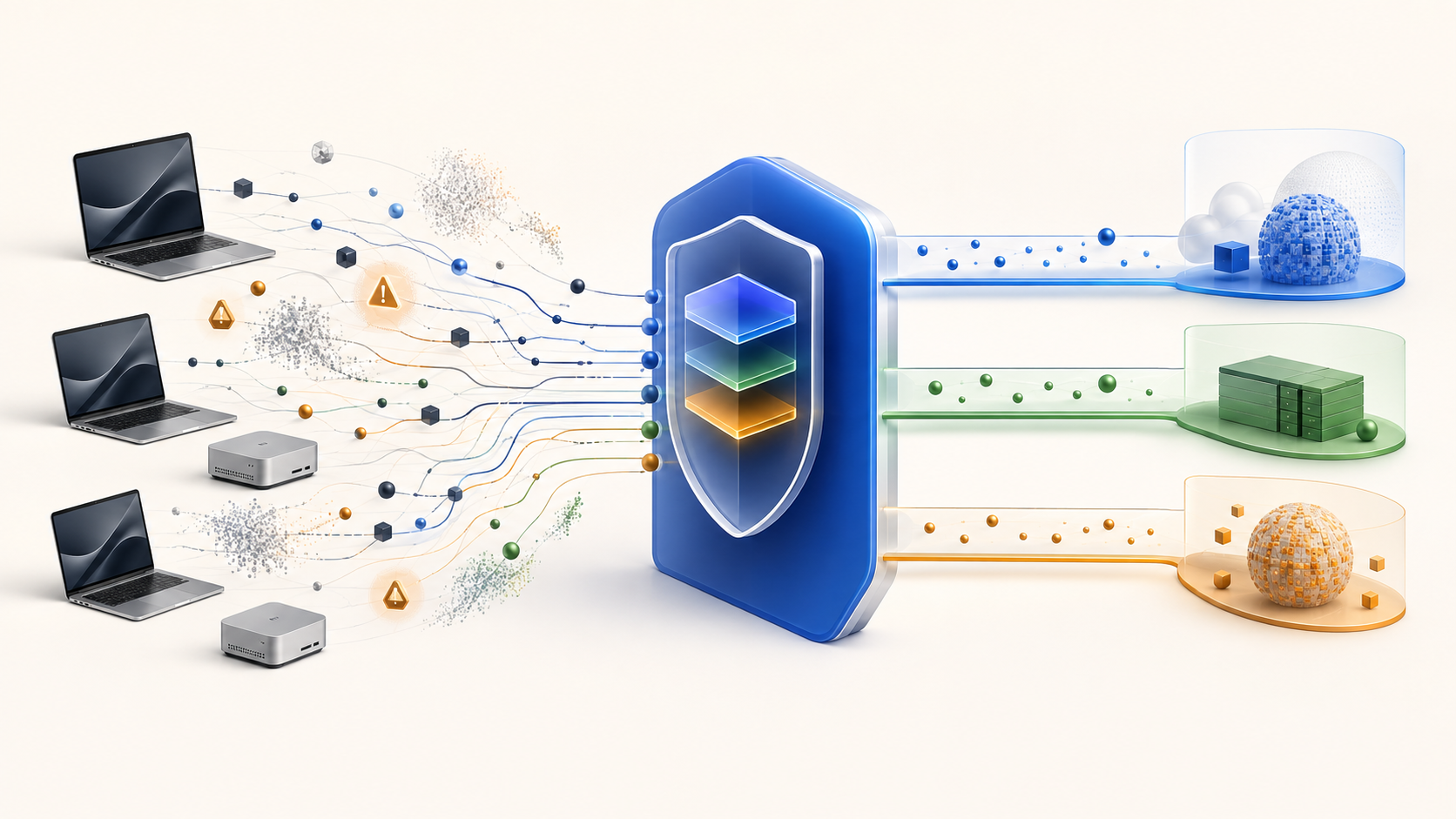
Many organizations start AI adoption with a simple pattern: give employees access to one or more online tools and let them choose the model they prefer.
That works early, but it creates problems as usage spreads:
- Provider keys and subscriptions become scattered across tools, teams, and personal accounts.
- Expensive online models handle routine work that smaller or local models could complete.
- Sensitive prompts can leave the organization because users do not always know which model is safe for a given request.
- IT and security teams cannot easily tell which applications are using AI, which models are being called, or where requests are going.
- Business leaders see the invoice before they understand the workload behind it.
Apple fleets make a different approach practical. Modern MacBooks and Mac desktops can run useful local models for everyday work, while Mac Studio and Mac mini systems can provide shared private capacity for larger workloads. The missing layer is governance: a way to route requests intelligently, protect credentials, apply team policy, and observe usage across local, on-prem, and online inference.
Msty Nexus fills that role. Nexus sits between approved applications and the models they use, exposing OpenAI-compatible and Anthropic-compatible gateway routes while managing local runtimes, provider credentials, model catalogs, client tokens, Smart Routes, Smart Balancer pools, Cluster workloads, Usage, Gauge, Activity, and security boundaries from one control layer.
Reference Organization
The example organization has 1,500 employees and a managed Apple device program:
- Most knowledge workers use managed MacBook Air or MacBook Pro devices.
- Developers use higher-memory MacBook Pros and a small number of shared Mac Studio / Mac mini systems.
- Research labs and legal teams handle sensitive material that should stay under organizational control.
- Marketing uses a mix of public source material, private launch plans, brand assets, and external creative workflows.
- IT already manages devices through MDM and wants AI controls that fit the same operational model.
The organization wants four outcomes:
- Give employees a simple AI experience through Msty Studio, Msty Go, IDE assistants, internal tools, and approved third-party clients.
- Keep routine and sensitive tasks on device or on private infrastructure whenever possible.
- Permit online providers for approved workflows without distributing provider keys to every application.
- Give leaders, security, and Nexus administrators enough visibility to manage usage, cost, route quality, and policy exceptions.
Target Architecture
The architecture uses Nexus Runtime close to the machines doing inference and Nexus Console as the administrative surface for managing the fleet.
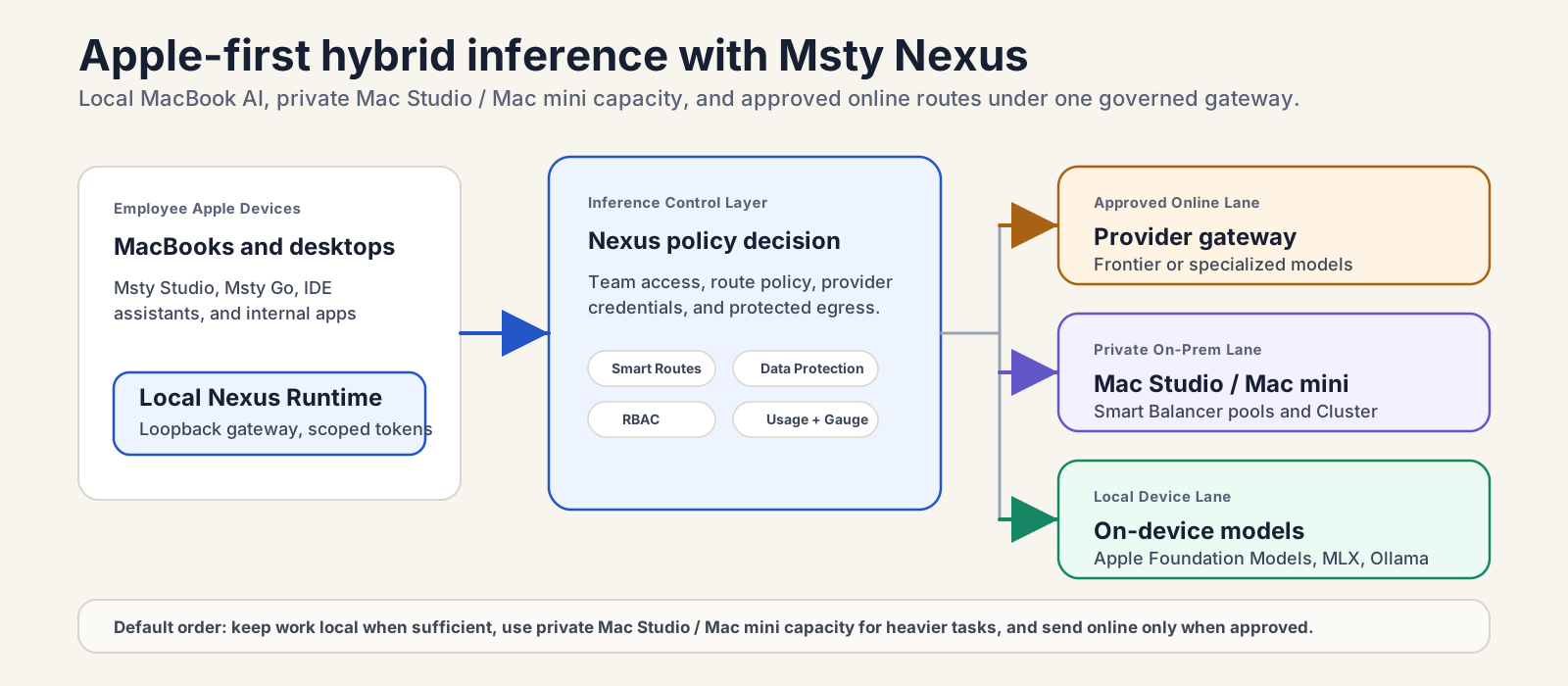
1. On-Device AI
Each managed Mac can run Nexus locally. Approved apps connect to the local Nexus gateway, usually on the loopback address, using a scoped client token.
The local device can serve:
- Apple Foundation Models and small or midsize MLX models optimized for Apple Silicon, with local Ollama or llama.cpp models where those runtimes fit the team’s strategy.
- Local helper models for routing or acceleration where supported.
- Device-local AI workflows that should not leave the user’s machine.
This layer handles everyday work such as summarization, rewriting, policy Q&A over non-sensitive material, first-pass code explanations, internal note cleanup, and private draft review.
2. On-Prem Mac Studio / Mac mini Capacity
The organization operates a private Mac Studio / Mac mini inference pool in its data center or secure office network. These machines run Nexus Runtime and are enrolled into the managed Fleet, where Nexus features such as Smart Balancer and Cluster make shared load balancing and larger distributed workloads easier to configure and operate.
This layer supports:
- Smart Balancer pools that distribute independent requests across compatible model targets.
- Mac Studio and Mac mini nodes dedicated to larger open-weight models.
- Cluster deployments where multiple Apple Silicon Macs cooperate on distributed MLX inference for models that do not fit comfortably on one machine.
- Private fallback capacity when an employee Mac is busy, asleep, underpowered, or missing the right model.
Applications do not need to know which Mac Studio or Mac mini node handles a request. They call one stable Nexus model value such as a preset, route, or pool. Nexus handles the routing and destination selection behind the gateway.
3. Approved Online Providers
Online providers remain part of the architecture, but they are no longer the default destination for every request.
Nexus administrators connect approved providers once, keep provider credentials behind Runtime, and expose only the models, routes, presets, or aliases that teams are allowed to use. Developers may get access to frontier coding models for approved activities. Marketing may get access to online creative or research models. Legal and lab teams may have no online fallback for sensitive workflows.
The online layer is used deliberately:
- Deep engineering analysis that requires a specialized hosted model.
- Public or cleared marketing ideation where online processing is approved.
- Large multimodal or tool-heavy requests that exceed local capability.
- Fallbacks for approved workflows when private capacity is unavailable.
4. Governance And Observability
Nexus becomes the control point between users, applications, models, and providers.
Administrators use Nexus to manage:
- Fleet enrollment and machine readiness.
- Teams and machine access for Enterprise deployments.
- Client tokens for approved applications and workloads.
- Local runtimes, model visibility, aliases, presets, routes, pools, and clusters.
- Smart Route policy for which request types go local, on-prem, or online.
- Data Protection behavior that can clean, block, or reroute sensitive requests.
- Usage, Gauge, and Activity for request trends, token use, provider capacity, route behavior, and operational events.
Team Routing Model
The most important design decision is not which model is best. It is which classes of work belong on which route.
| Team | Default route | Escalation route | Online policy |
|---|---|---|---|
| Developers | Local code assistant on MacBook or private Mac Studio / Mac mini pool | Online coding model for approved non-secret tasks | Allowed for selected activities; blocked or rerouted when sensitive content is detected |
| Lab / R&D | Local MLX model on assigned lab Macs | Private Apple Silicon cluster for heavier analysis | Disabled unless a specific project is cleared |
| Legal | Local or on-prem legal review route | Private larger model for contract analysis | Disabled for confidential matters; optionally allowed for public legal research |
| Marketing | Local brand and draft review | On-prem model for launch-sensitive work | Allowed for public research, creative ideation, and approved media workflows |
| Executives | Local summarization and briefing route | On-prem route for confidential strategy work | Allowed only through executive-approved routes |
| General staff | Local productivity route | Private shared fallback when local device is unavailable | Limited to approved low-risk tasks |
These routes should start small. A strong first deployment might use one general local route, one sensitive private route, one developer route, and one approved online route. The organization can add lanes later when Usage and route insights show a clear operational reason.
Example Smart Routes
General Productivity Route
Model value: @route/general-productivity
This is the default route for most staff. It handles simple writing, summarization, formatting, and internal Q&A.
- Local lane: routine writing, summarization, and short transformations run on the user’s Mac when a compatible local model is ready.
- Private fallback: if the local model is unavailable or the request is too large, Nexus sends the task to a Mac Studio / Mac mini Smart Balancer pool.
- Online lane: disabled by default for this route.
Developer Route
Model value: @route/engineering-assist
This route gives developers productivity without letting every coding request become an online request.
- Local lane: explain code, summarize diffs, draft tests, write small functions, and refactor low-risk snippets.
- Private lane: analyze larger internal repositories, proprietary stack traces, architecture notes, and internal service docs on Mac Studio / Mac mini capacity.
- Approved online lane: use frontier or specialized coding models for cleared work such as generic library usage, public API questions, or non-secret debugging examples.
- Protected behavior: block, clean, or reroute requests that include credentials, customer data, proprietary source sections, unreleased product details, or other restricted material.
Lab Route
Model value: @route/lab-private
The lab route assumes that experiment notes, formulas, trial data, and unpublished results stay inside organizational control.
- Local lane: routine scientific notes, extraction, and first-pass summarization on assigned Apple Silicon Macs.
- Cluster lane: larger analysis routed to the private Apple Silicon Cluster when the model requires pooled memory or compute.
- Online lane: unavailable unless a specific lab project has an approved egress path.
Legal Route
Model value: @route/legal-private
Legal workflows need conservative defaults.
- Local lane: summarize, compare, and extract clauses from confidential contracts and internal memos on device.
- Private lane: route longer contract sets, matter chronologies, or policy comparisons to on-prem models.
- Online lane: optionally allowed only for public research or previously cleared material.
- Protected behavior: block online processing for PII, privileged material, customer records, and matter-specific facts.
Marketing Route
Model value: @route/marketing-mix
Marketing benefits from both private context and online creativity.
- Local lane: rewrite drafts, check brand tone, review launch-sensitive copy, and summarize internal briefs.
- Private lane: evaluate campaign plans, confidential positioning, and unreleased product messaging on on-prem Mac Studio / Mac mini models.
- Online lane: use approved hosted models for public research, external trend analysis, image workflows, or campaign ideation that does not include confidential launch details.
Implementation Plan

Phase 1: Define The Routing Policy
Before installing anything broadly, IT, security, legal, and team leads define the first routing policy:
- Which teams can use local, on-prem, and online models.
- Which data classes must stay on device or on-prem.
- Which online providers and model groups are approved.
- Which apps can call Nexus.
- Which requests should be blocked, cleaned, or rerouted.
- How long Usage and Gauge data should be retained.
This creates the operating contract for the deployment. Nexus enforces the technical pieces, but the organization still needs clear policy ownership.
Phase 2: Build The Apple Pilot
Start with a small Apple pilot:
- Ten developer MacBook Pros.
- Ten legal and lab Macs.
- A small group of marketing and executive users.
- Two to four Mac Studio or Mac mini machines for shared private capacity.
Install Nexus on pilot Macs, confirm Runtime health, prepare one local runtime, add or import at least one local model, and create scoped client tokens for the approved apps. Keep Runtime local-only unless another trusted device or private-network route must connect.
Phase 3: Stand Up Mac Studio / Mac mini Capacity
Enroll Mac Studio and Mac mini systems into Fleet and assign recognizable names, locations, and roles. Configure private network access or trusted VPN connectivity where the deployment requires cross-device inference.
Create a Smart Balancer pool for models that can run independently on each Mac Studio or Mac mini. Use Cluster only when the organization needs multiple Apple Silicon machines to cooperate on one distributed MLX workload. Cluster requires supported Apple Silicon Macs, a trusted local network, Thunderbolt topology, RDMA, and the right Enterprise entitlement.
Phase 4: Add Online Providers Behind Nexus
Add approved hosted providers in Nexus rather than distributing provider keys to end-user applications. Sync the model catalog, hide models that should not be exposed, create aliases or presets for stable names, and validate provider behavior before sending production traffic.
Online access should be visible as policy, not as a free-form model picker. Developers, marketing, and executives may have different model groups and route lanes. Legal and lab routes can keep online lanes disabled by default.
Phase 5: Create Teams, Tokens, And App Connections
Create one client token per approved application or workload. This makes access identifiable, limitable, rotatable, and revocable without changing provider keys.
For Enterprise deployments, assign teams to the machines they are allowed to reach. Pair team access with route policy so the selected team receives the right model groups, online permissions, protected routes, and rate limits.
Approved applications then use the Nexus gateway URL and token as their OpenAI-compatible or Anthropic-compatible connection. Apps call stable values such as @route/engineering-assist, @pool/private-coding, or @preset/legal-review instead of hard-coding provider-specific model IDs.
Phase 6: Validate And Expand
Run representative prompts before broad rollout:
- Routine requests that should stay local.
- Sensitive requests that must be blocked or kept private.
- Heavy requests that should reach Mac Studio / Mac mini capacity.
- Approved online requests that should pass.
- Boundary requests that might match more than one lane.
- Failure cases where a local model is unavailable or an online provider is constrained.
Use Usage, Activity, Smart Route decision history, and Gauge capacity signals to tune routes. Expand only after the first route set behaves predictably.
Value By Organizational Layer
Nexus Administrators
Nexus administrators gain a practical operating surface for AI infrastructure:
- One place to manage local runtimes, provider connections, visible models, aliases, presets, Smart Routes, Smart Balancer pools, Cluster capacity, and machine readiness.
- Scoped client tokens for each app or workload instead of shared provider keys.
- Route history that explains where work went and why without storing prompt and response content in usage records.
- Safer maintenance through pool draining, fleet visibility, model health checks, and activity tracking.
- A cleaner rollout path from one Mac to a managed Apple fleet.
C-Level Leaders
Executives need adoption and economics, not raw provider logs.
A leadership view built from Nexus Usage, Gauge, and Activity should answer:
- How much AI work is happening across the organization.
- Which teams and applications are driving usage.
- What share of traffic stays local, on-prem, or online.
- Which model groups cost the most.
- How much traffic Smart Routes kept away from expensive online fallbacks.
- Whether online account limits, budgets, or provider health may affect critical work.
- Whether private Apple infrastructure is being used effectively.
The core business value is not simply token savings. It is better allocation: routine requests run on cheaper or owned capacity, sensitive work stays controlled, and premium online models are reserved for work that benefits from them.
Information Security
InfoSec gains a central enforcement point:
- Provider keys remain behind Nexus instead of being copied into every app.
- Client tokens can be issued, limited, rotated, and revoked per application.
- Data Protection behavior can clean, block, or reroute protected content before it reaches an online model.
- Guardrails such as PII detection and redaction provide an additional security layer before approved online processing.
- Network exposure starts local-only and must be explicitly configured for LAN, browser CORS, private network, or hosted access.
- Diagnostics and usage records are designed around support-safe metadata rather than raw prompts, responses, credentials, or local paths.
- Legal, lab, and executive routes can have no online fallback for restricted data classes.
The security posture still depends on configuration, retention settings, identity practices, and user behavior. Nexus gives the organization the place to enforce those decisions.
End Users
End users do not need to become model-routing experts.
They select a sanctioned model value in their app, or the app uses it automatically. Nexus handles the destination behind the scenes:
- Routine work feels faster because small local models are close to the user.
- Heavy private work can use shared Mac Studio / Mac mini capacity without exposing provider keys.
- Approved online models remain available for tasks that need them.
- Users see fewer policy interruptions because sensitive routes can be designed around their actual workflow.
- Teams get more AI access with less pressure to understand token pricing, model catalogs, or provider-specific settings.
The user experience should feel automatic, but the routing should never be invisible to administrators. That balance is the point of the control layer.
Expected Benefits

Cost Control
Nexus helps reduce avoidable online token spend by keeping simple work on local models, sending heavier private work to owned Mac Studio / Mac mini capacity, and reserving online providers for approved high-value tasks.
Savings should be measured against the configured fallback route, not assumed. Usage and route insights can compare what happened with what would have happened if more traffic had gone to the online fallback.
Data Control
Sensitive work can remain local or on-prem by default. Legal, lab, and executive routes can be designed with no online lane. Developer routes can allow online models only after protected content checks pass.
Better Use Of Apple Hardware
Managed Macs become more than client devices. They can run useful local inference, participate in private capacity, and give the organization a hardware-backed AI strategy that matches its existing Apple fleet investment.
Simpler App Integration
Apps connect to a standard gateway instead of managing every provider separately. Provider credentials, model visibility, presets, and routing rules stay behind Nexus.
Governance Without Blocking Productivity
Users keep a simple workflow. Administrators keep control over routes, credentials, team access, and observability. Security teams can apply guardrails where the request crosses a boundary instead of relying on every individual user to classify every prompt correctly.
Practical Limitations
This architecture should be implemented with realistic expectations:
- Local models are not always equivalent to premium online models. Route policies should reflect task quality, not only cost.
- Some requests need larger context, multimodal support, tool use, or specialized reasoning that local models may not provide.
- Local-only outcomes depend on configuration. A route with an online fallback can still send content online if policy allows it.
- PII detection and redaction are guardrails, not guarantees. Some sensitive data can avoid detection, especially when it does not look like typical PII.
- Usage, Gauge, Activity, and diagnostics provide support-safe operational visibility, not full prompt inspection.
- Legal, privacy, and compliance teams should review data classification, retention, online provider terms, and user training before rollout.
Conclusion
An Apple-first AI strategy should not require choosing between unrestricted cloud AI and isolated local experiments.
Msty Nexus gives the organization a middle path: local models on employee Macs, private shared capacity on Mac Studio / Mac mini infrastructure, and approved online models behind explicit governance. The employee gets a simple AI experience. IT gets a manageable inference layer. Security gets policy enforcement at the gateway. Executives get visibility into usage, cost, and capacity.
The practical value comes from routing the right request to the right place. With Nexus, that decision can become part of the organization’s AI infrastructure instead of a judgment every user has to make alone.