
If you want local AI that starts fast and stays under your control, LLaMA.cpp is one of the best options inside Msty Studio. Getting started with LLaMA.cpp is simple with Msty Studio while also gives you enough control to fine-tune response quality for real work.
Video Guide
This post focuses on showing you how Msty Studio helps you get value from LLaMA.cpp quickly, and why LLaMA.cpp is such a strong local inference engine.
Why LLaMA.cpp is a great local inference option
When teams evaluate local AI, the first question is usually speed to value. LLaMA.cpp is strong here because it starts quickly, runs efficiently on common hardware, and gives you practical quality and performance tradeoffs with quantized models.
In Msty Studio, that speed becomes an easy onboarding path. You can install LLaMA.cpp from Model Hub in a guided flow, or connect an existing local setup without rebuilding your environment. That shortens rollout time for both first-time users and advanced users.
Msty Studio also makes ongoing model management much simpler. You get model fit guidance, clear service status, and centralized controls in one place, so teams spend less time troubleshooting runtime details and more time improving output quality.
Most importantly, Msty Studio gives you cohesion across inference workflows. LLaMA.cpp and other model providers are managed in one consistent experience, with strong chat capabilities like context controls, conversation continuity, and split chat comparisons.
Msty Studio makes using LLaMA.cpp quick to start and easy to manage
Quick setup from Model Hub
When first onboarding Msty Studio, you have the option to start right away with LLaMA.cpp.
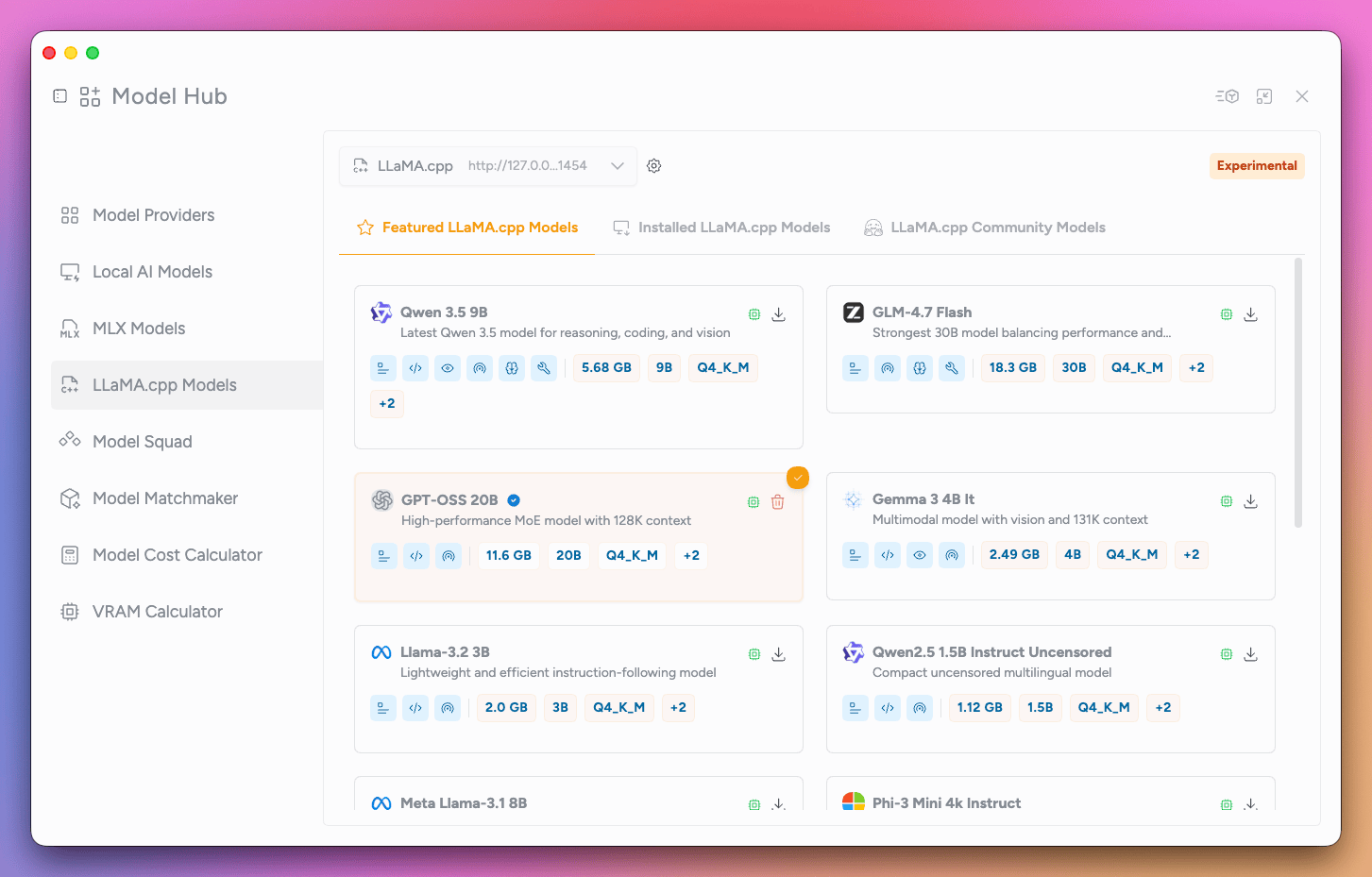
If you’re already up-and-running with Msty Studio and are curious about LLaMA.cpp, then you are just a few clicks away. Open Model Hub, choose LLaMA.cpp, and run the setup flow. LLaMA.cpp will be installed with a model ready to chat with in no-time.
You can start with a smaller model for speed, then move to a larger one when you want stronger output quality.
Use existing local installs if you already have one
If LLaMA.cpp is already running on your machine, Msty Studio lets you point to your existing model location. This is useful for users who already manage local model files and do not want to rebuild their environment. It also helps advanced users migrate into Msty Studio without changing their whole stack.
Built-in hardware fit guidance
The model list includes a chip indicator so you can quickly see whether a model is a good fit for your device. That simple signal helps non-technical users avoid poor model choices before they hit performance issues.
The Msty settings that matter most with LLaMA.cpp
Context window set to 0 for max model context
In Msty Studio, setting context window to 0 under LLaMA.cpp parameters uses the model’s maximum context size. This often improves continuity in longer chats because the model can “see” more prior conversation. The tradeoff is memory pressure and slower processing on weaker machines.
Choose the right context-limit behavior
When context fills up, Msty Studio gives you two practical options. truncate middle keeps the beginning and most recent messages, while trimming the middle. truncate old prioritizes recent messages by dropping older turns first.
This allows you to maintain prolonged conversations with models that remember the most important parts of the conversations, resulting in persisting quality responses.
Watch service health and network options
Msty Studio surfaces service health, restart/stop controls, endpoint info, and update checks for LLaMA.cpp. You can also enable network access when you want local inference to be available on your network.
The Executive lens - cost, risk, and rollout
A local stack built on Msty Studio plus LLaMA.cpp can reduce cloud dependency for many day-to-day tasks and keep sensitive prompt data on managed devices. It also helps teams move from experimentation to repeatable operations because setup and controls are accessible to non-specialists.
From an operations standpoint, this also improves how teams manage change. Leaders can roll out local AI in phases, starting with lower-risk internal use cases, measuring adoption and response quality, then expanding into higher-sensitivity workflows once controls are proven. That gives stakeholders clearer checkpoints, fewer surprises, and a more predictable path from pilot to production.
Conclusion
LLaMA.cpp gives you the core local inference advantages teams actually need; including flexible deployment paths, efficient quantization, broad hardware support, and a clear way to scale from laptop tests to production workflows.
Msty Studio turns those raw engine strengths into day-to-day value with fast onboarding, guided model fit, and operational controls that make local AI easier to run reliably. Together, they give you a practical path to private AI, lower ongoing inference cost, and faster adoption across technical and non-technical teams.